Ambrio

It remembers.It gets it done.

Ambrio is a personal assistant that lives on your phone. When your passport expires, when it’s Mom’s birthday, where your money went this month: it keeps track of all of it and gives you a heads-up in time. Just say the word and it adds the event to your calendar, sets the alarm or logs the expense.

Your data stays on your own devices by default. No account needed to use it; multi-device sync needs an Ambrio account.

CAmbrio
Mom’s birthday is next week. Help me plan it?
✓ Checked People
✓ Reminder: Oct 3, get the gift
Needs your approval Calendar: Oct 4, 6:30 PM, birthday dinner with Mom
AllowDecline
✓ Added to calendar
Ask anything, or give me a task

What it does, in detail

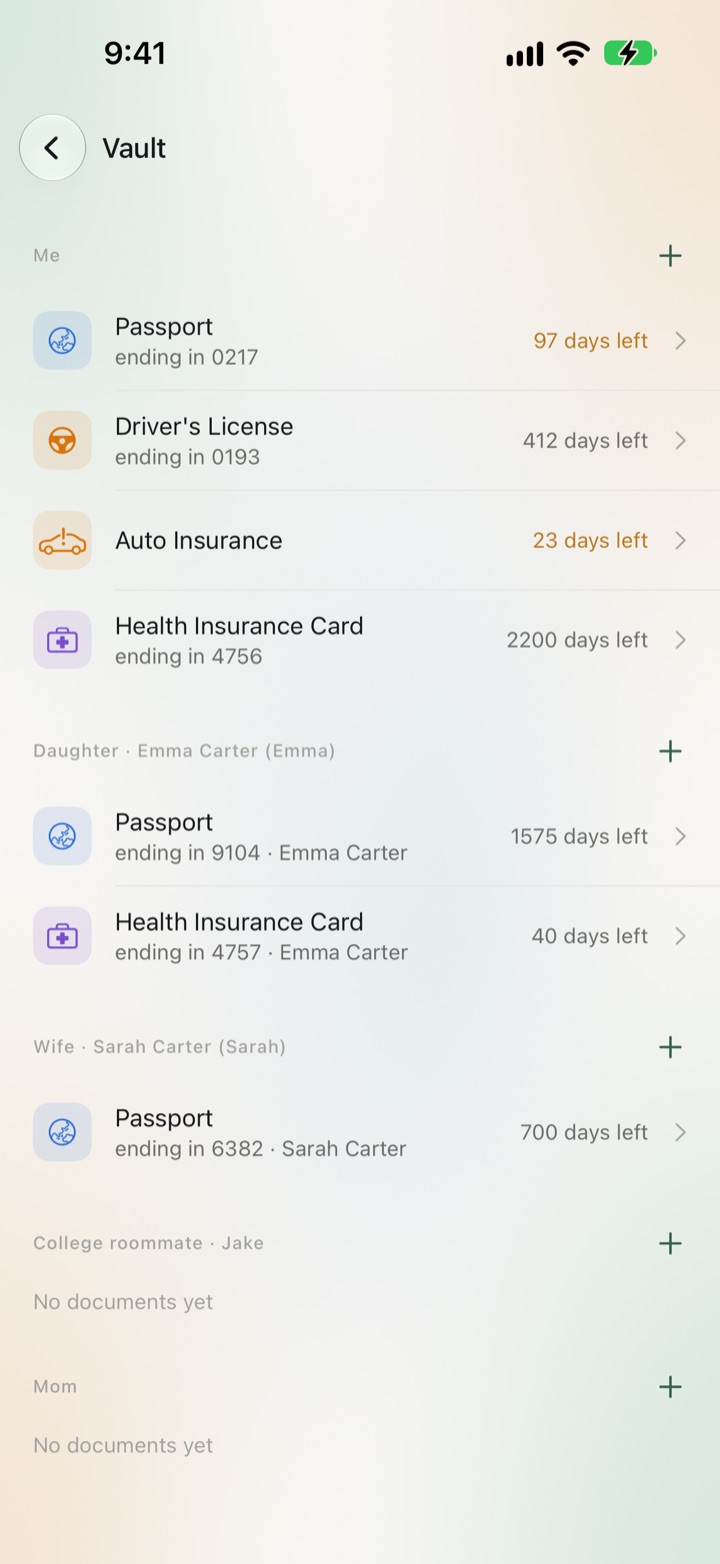
Vault: documents grouped by person — your passport, driver’s license, auto insurance and health insurance card, plus your daughter’s and wife’s documents, each showing days left
Vault and documents

Take one photo, and the number and expiry date are on file

  • It reads the document type, number, holder and expiry date from the photo, and you check them before saving. Photos stay on your device
  • Your documents and your family’s are grouped by person, each with its own countdown
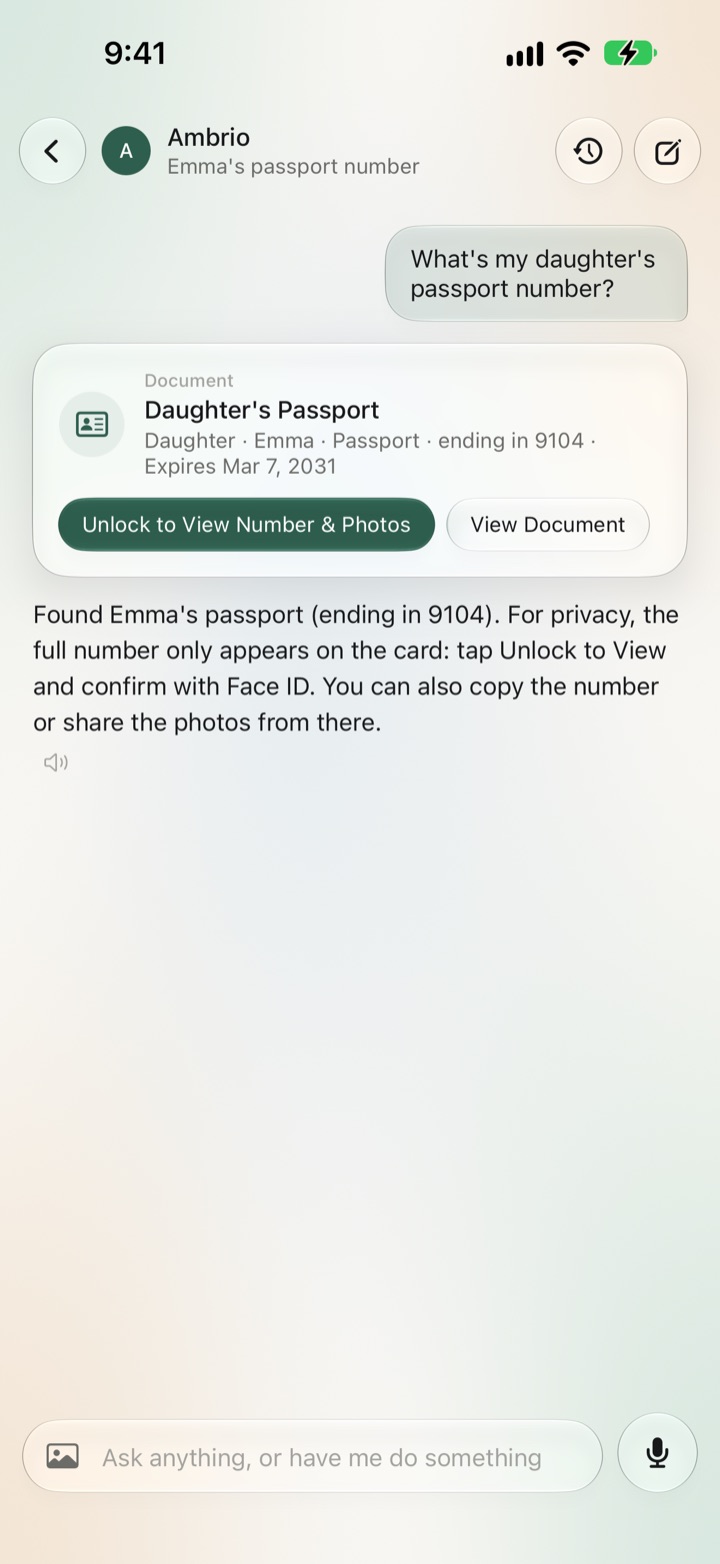
  • Full numbers stay hidden until you verify with Face ID or fingerprint
Chat: asked for the daughter’s passport number, Ambrio shows a document card with only the last digits until you unlock it
Chat and actions

Say it once, and it gets done

  • Set reminders, log expenses, add calendar events, set alarms, draft text messages and look things up online
  • Reading happens right away. Anything that changes your phone shows a confirmation card first and runs only after you tap “Allow”. Deleting always needs your approval
  • Ask “what’s my daughter’s ID number?” and it finds the card, showing the full number only after you verify
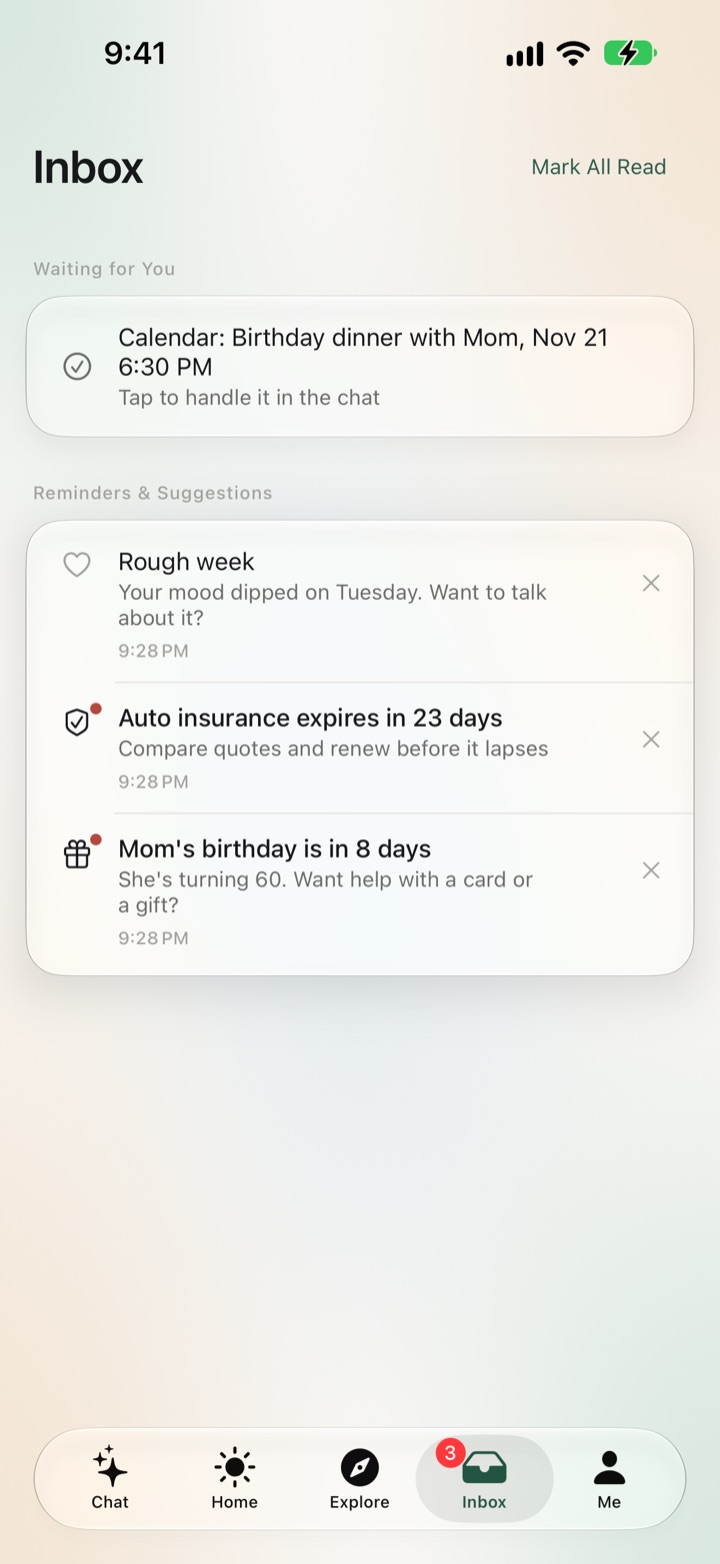
Inbox: a calendar event waiting for approval, plus reminders and check-ins such as Mom’s birthday in 8 days and auto insurance expiring in 23 days
Reminders and briefings

What you need to remember, before you need it

  • A briefing every morning with the few things worth your attention today
  • Expiry dates, birthdays and bills, with alarms that ring on time. Passports and other travel documents get reminders starting 180 days out
  • A heads-up when you’re close to your budget. If you’ve been down several days in a row, it checks in, at most once a day
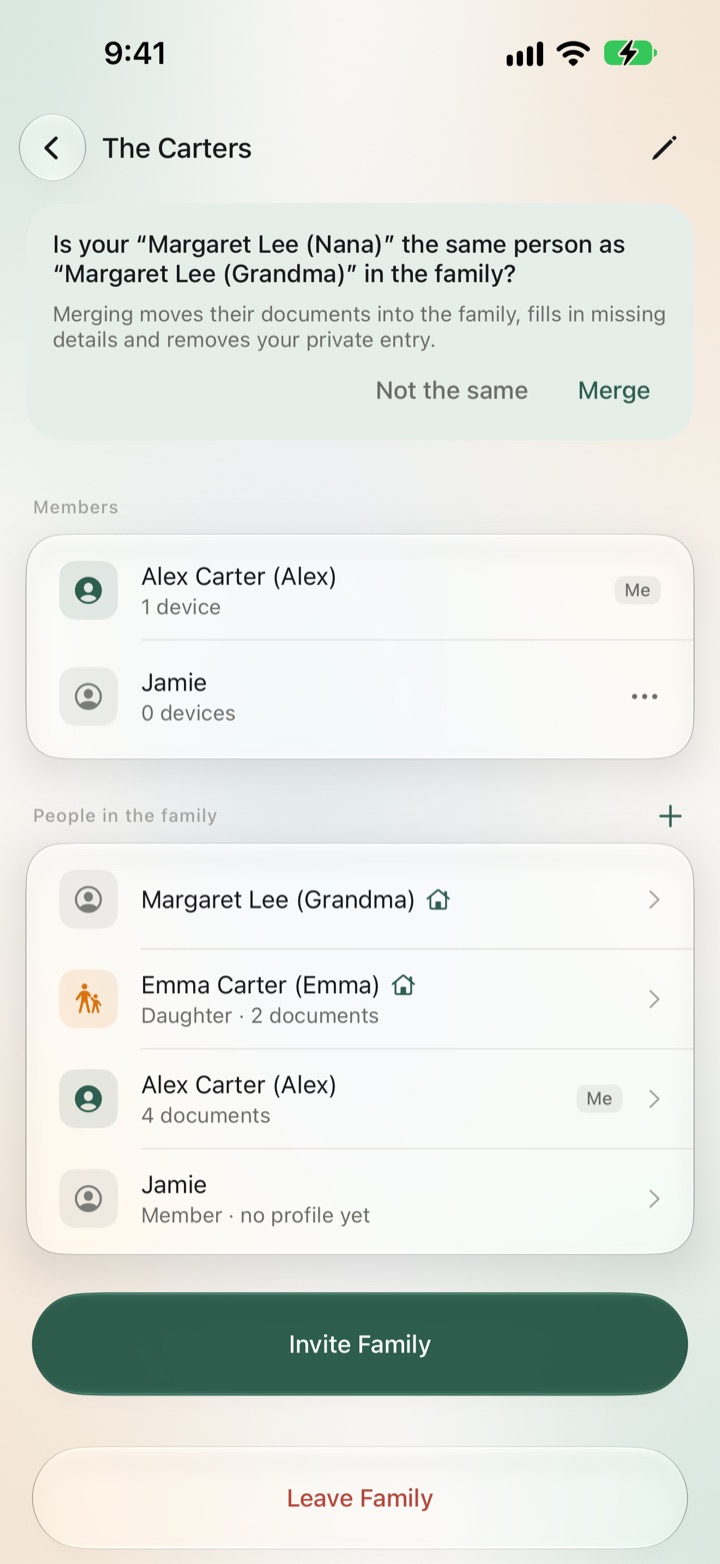
Family page: a prompt asks whether your Margaret Lee (Nana) is the same person as Margaret Lee (Grandma) in the family, above the members and people in the family
Family

Your family’s documents, looked after together

  • “People in the family” lists everyone. Tap “Add” to pick from your People, or create someone new
  • If someone a family member added is a person you already have, it asks first, and merges them only when you tap “Merge”
  • Only the people you put in Family and their documents are shared. Your chats, memories, notes and spending stay yours
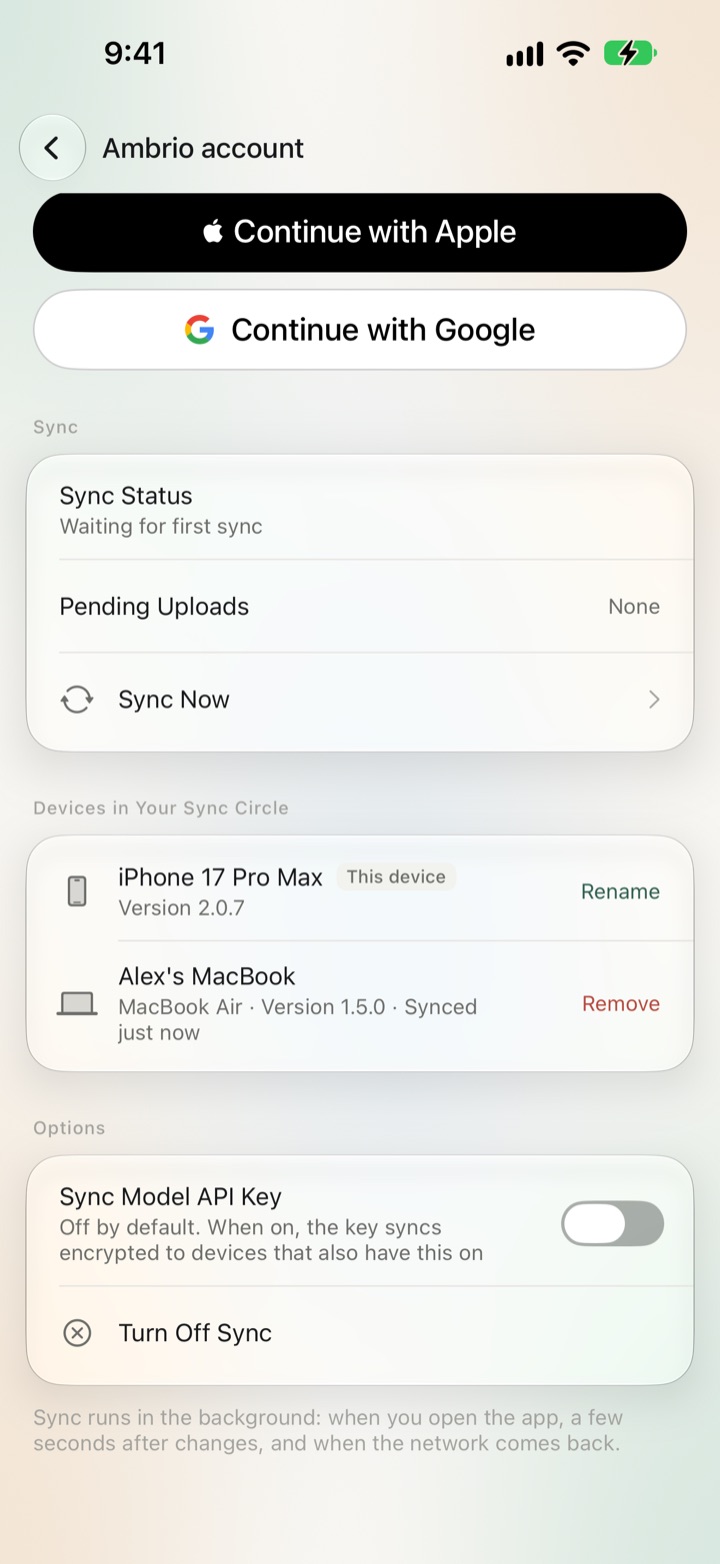
Account page: sync status and the devices in the sync circle, this iPhone and Alex’s MacBook, with options to rename or remove a device
Sync

Your phone and computer share the same records

  • Sign in to the same Ambrio account on each device and they sync automatically. Data is encrypted on your device first, so we can’t read it
  • The device list shows each device’s name, model and app version
  • Remove a device you no longer use. It stops receiving new data and the sync key is replaced

On every device

iPhone, Android and Mac share the same records and sync once you sign in to the same Ambrio account. The app comes in English and Chinese, and your Region decides which document types are offered.

iPhone

iOS 26 or later

Snap documents, set reminders in a sentence and read your daily briefing. Lock your documents with Face ID.

Android

Android 8.0 or later

Reminders ring on time, and it can add events to your calendar and set alarms. Lock your documents with your fingerprint.

Mac

macOS 26 or later

The same Ambrio, with a few extra tools for your desktop.

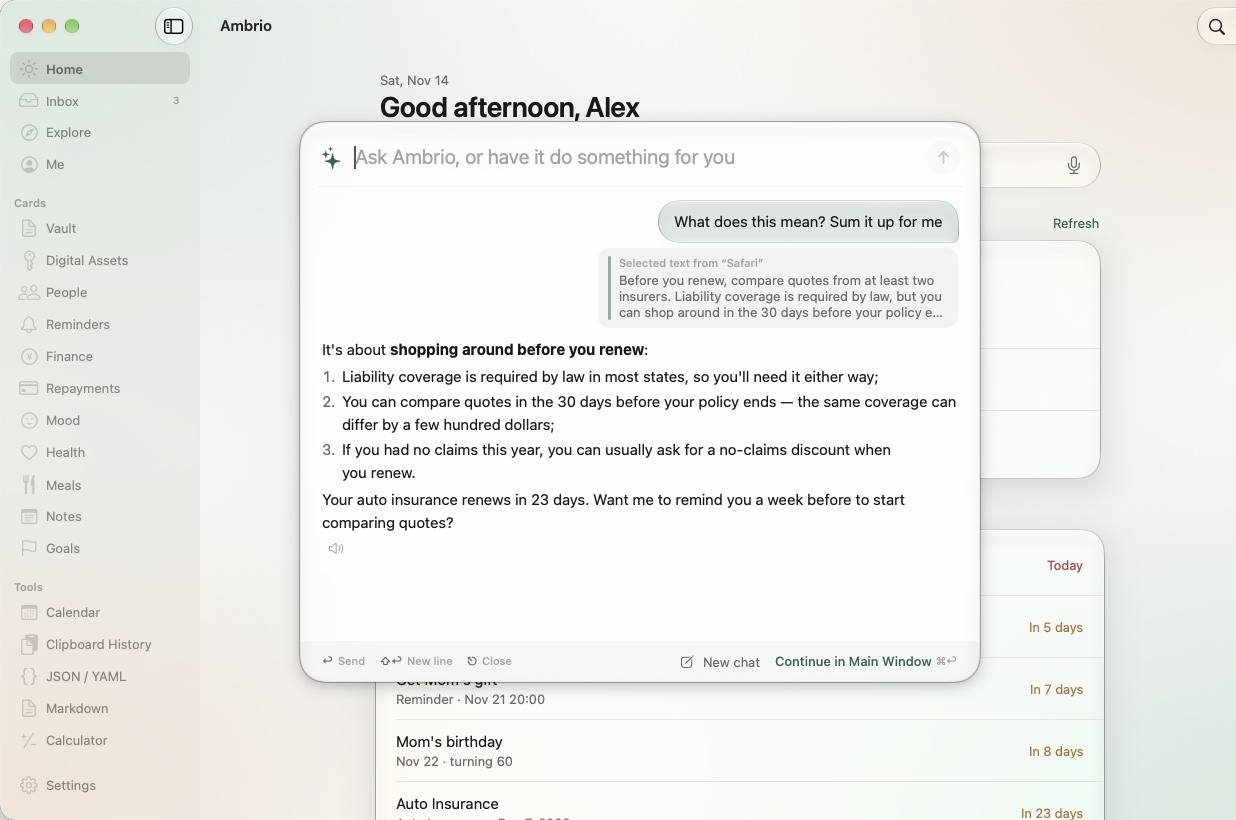
Ambrio for Mac: the Quick Ask panel floats over the main window’s Home page, having summarized an auto insurance tip selected in Safari and offering a reminder to compare quotes
  • ⌥Space

    Quick Ask

    Bring it up in any app. Selected text comes along automatically.

  • ⌥⌘Space

    AutoFill

    A form wants your ID or passport number? Fill it from the Vault after you verify.

  • Drag into the main window

    Drop to File

    Drop in a PDF or screenshot and it picks out documents and travel plans.

  • ⌥⌘LLauncher ⌃⌥=Calculator ⌃⌥JFormatter

    Launcher · Calculator · Formatter

    Handy little tools, each one a shortcut away.

Your life stays on your own devices

The more an assistant knows, the more useful it is. That’s exactly why we spell out where the lines are.

Phone Encrypted relay · sees only ciphertext Computer
Every device keeps a full copy of your data. Changes are encrypted and passed between devices through the relay. Sign in to the same Ambrio account on each device to sync.

Data stays on your device

Records, memories, spending and chats are kept on your own device. We never receive them. Sign-up is optional, with no third-party analytics or ad SDKs, just an anonymous usage count you can turn off.

Consent comes first

Before you use AI for the first time, Ambrio explains what gets sent to the AI service you choose, and starts only once you agree. You can withdraw consent anytime in Settings.

It asks before acting

Anything that changes your phone shows a confirmation card first, saying exactly what it will do. It runs only after you tap “Allow”, and every step is logged.

Encrypted sync we can’t read

Your data is encrypted before it leaves your device and passed along by a relay. Sync needs an Ambrio account, which keeps your sync key encrypted with your password. We don’t hold the key and can’t read it.

How it differs from a general AI chatbot

General AI chatbotAmbrio
MemoryForgets once you start a new chatRemembers your preferences, family and important dates for the long run
ActionTells you how to do itWith your OK, adds calendar events, sets alarms and logs expenses itself
InitiativeSilent until you askReminds you ahead of expiry dates, birthdays and budgets
Your dataStored on the provider’s serversStays on your devices by default; export or erase it in one tap
AccountSign-up requiredOptional: works on one device without one; sync needs sign-in

Questions

Which AI service does it use? What is the API key, and what does it cost?

There are two ways. Sign in to an Ambrio account to use the Ambrio Cloud model, with a free daily quota and no key needed. Or use your own API key, with or without an account, from the service you choose: Volcano Engine Ark (Agent Plan, Coding Plan or pay as you go), DeepSeek, Kimi (Moonshot AI), Zhipu GLM, Qwen, OpenAI, Gemini… and other OpenAI-compatible services. Create an API key in that service’s console and paste it into Me → Settings → Model (on Mac, Settings → Model). Usage is billed by the service based on how much you use, and you settle it with them directly. Ambrio never handles it. The key is kept only in your device’s secure storage; only if you turn on “Sync model API key” is it synced, end-to-end encrypted, to your own other devices.

Where is my data stored?

In a database on your own device. We don’t have a server that stores your readable data. Once you agree, only what a conversation needs is sent to the AI service you choose to generate a reply. If you choose the Ambrio Cloud model, that content passes through the Ambrio service to the model provider, and the Ambrio service doesn’t store or log it. With sync on, changes are encrypted on your device and passed along by a relay that only sees ciphertext.

What happens when I get a new phone?

If you still have the old phone, sign in to the same Ambrio account on the new phone. Everything syncs across. You can also export a backup in Me → Data and restore it on the new phone. Android and iPhone use the same backup format, so either can import the other’s. Backups don’t include your API key or photos.

How do family members join?

In Me → Family, tap “Invite Family”, and your family member scans the QR code on your screen with Ambrio. From then on, both of you can see and edit the people in the family and their documents. Each person’s chats, memories and spending stay private.

Which systems are supported?

Download for Android 8.0 or later and macOS 26 or later here. The iPhone version is on the App Store and needs iOS 26 or later. The app comes in English and Chinese.

Is it free?

Ambrio itself is free, with no in-app purchases or subscriptions, and sign-up is optional. You can add your own API key and pay the AI service for what you use, or sign in to use the Ambrio Cloud model with a free daily quota.

Download Ambrio

Android

Version
2.1.3
Size
5.8 MB
Requires
Android 8.0 or later
SHA-256
6edff7b184447b04e551d2148ec4bbc602b301e3c31f7a480d16b45fbc10cd2e

If you’re warned about unknown sources during install, allow your browser to install apps in the system prompt.

Mac

Version
2.1.3
Size
13.4 MB
Requires
macOS 26 or later
SHA-256
dfe239014dbcb03b24ab9374d5d25501409132c6981ae18b14d54b5a26fa9327

Open it and drag Ambrio into Applications. Notarized by Apple.

iPhone

Requires
iOS 26 or later

Not available on the App Store in mainland China.