Confidant

It remembers.It gets it done.

Confidant is a personal assistant that lives on your phone. When your passport expires, when it’s Mom’s birthday, where your money went this month: it keeps track of all of it and gives you a heads-up in time. Just say the word and it adds the event to your calendar, sets the alarm or logs the expense.

Your data stays on your own devices. No account needed.

CConfidant
Mom’s birthday is next week. Help me plan it?
✓ Checked People
✓ Reminder: Oct 3, get the gift
Needs your approval Calendar: Oct 4, 6:30 PM, birthday dinner with Mom
AllowDecline
✓ Added to calendar
Ask anything, or give me a task

What it does, in detail

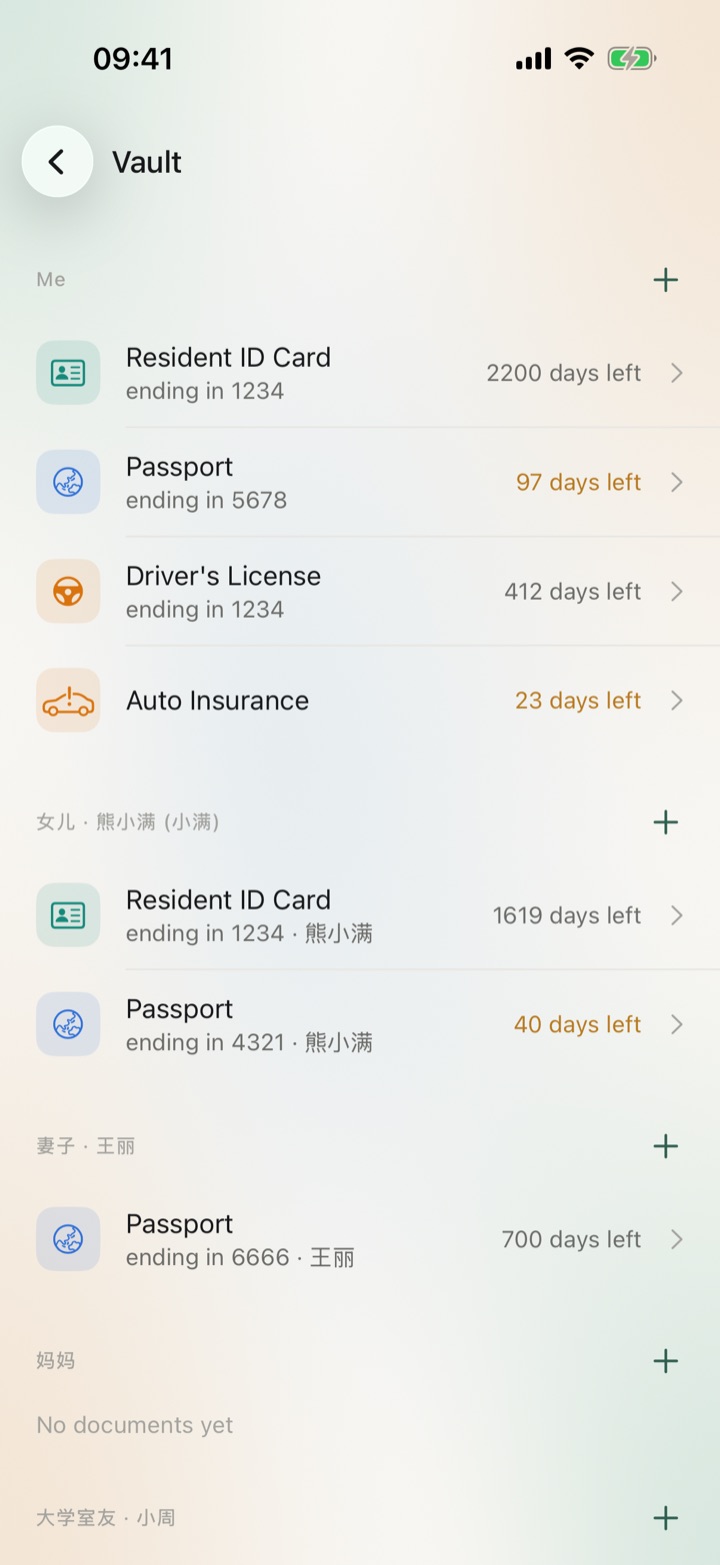
Vault: documents grouped by person, with your ID card, passport, driver’s license and car insurance, plus your daughter’s and wife’s documents, each showing days left
Vault and documents

Take one photo, and the number and expiry date are on file

  • It reads the document type, number, holder and expiry date from the photo, and you check them before saving. Photos stay on your device
  • Your documents and your family’s are grouped by person, each with its own countdown
  • Full numbers stay hidden until you verify with Face ID or fingerprint
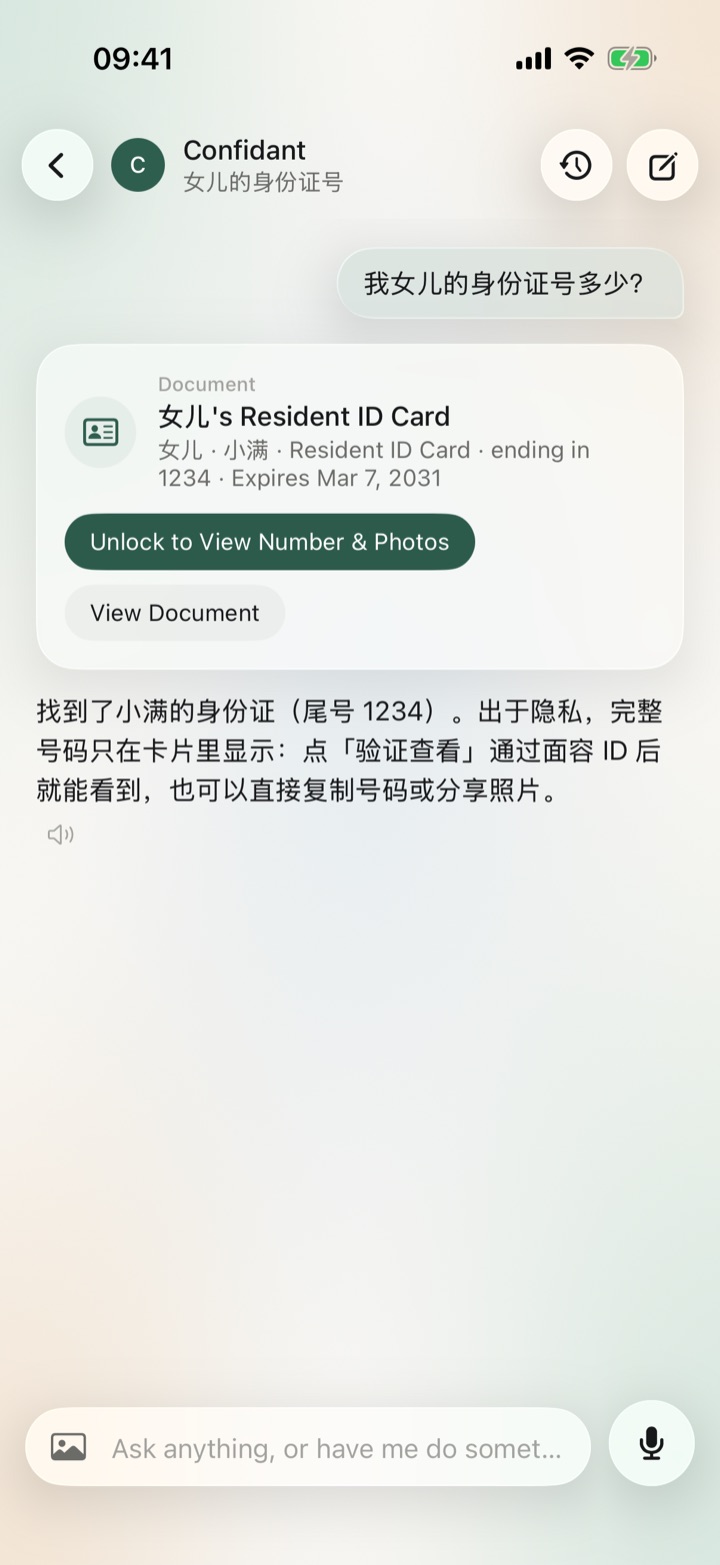
Chat: asked for the daughter’s ID number, Confidant shows a document card with only the last digits until you verify
Chat and actions

Say it once, and it gets done

  • Set reminders, log expenses, add calendar events, set alarms, draft text messages and look things up online
  • Reading happens right away. Anything that changes your phone shows a confirmation card first and runs only after you tap “Allow”. Deleting always needs your approval
  • Ask “what’s my daughter’s ID number?” and it finds the card, showing the full number only after you verify
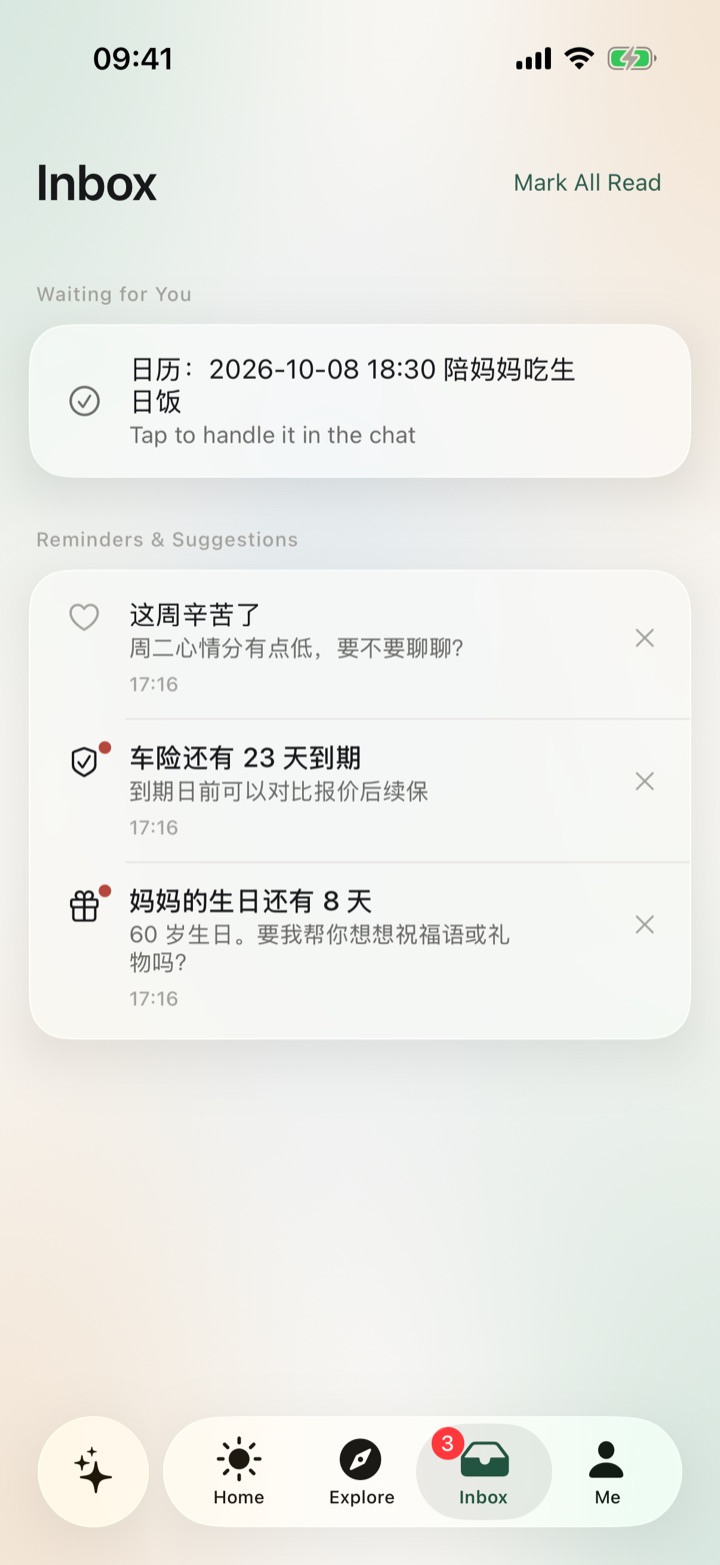
Inbox: a calendar event waiting for approval, plus reminders and check-ins such as Mom’s birthday in 8 days and car insurance expiring in 23 days
Reminders and briefings

What you need to remember, before you need it

  • A briefing every morning with the few things worth your attention today
  • Expiry dates, birthdays and bills, with alarms that ring on time. Passports and other travel documents get reminders starting 180 days out
  • A heads-up when you’re close to your budget. If you’ve been down several days in a row, it checks in, at most once a day
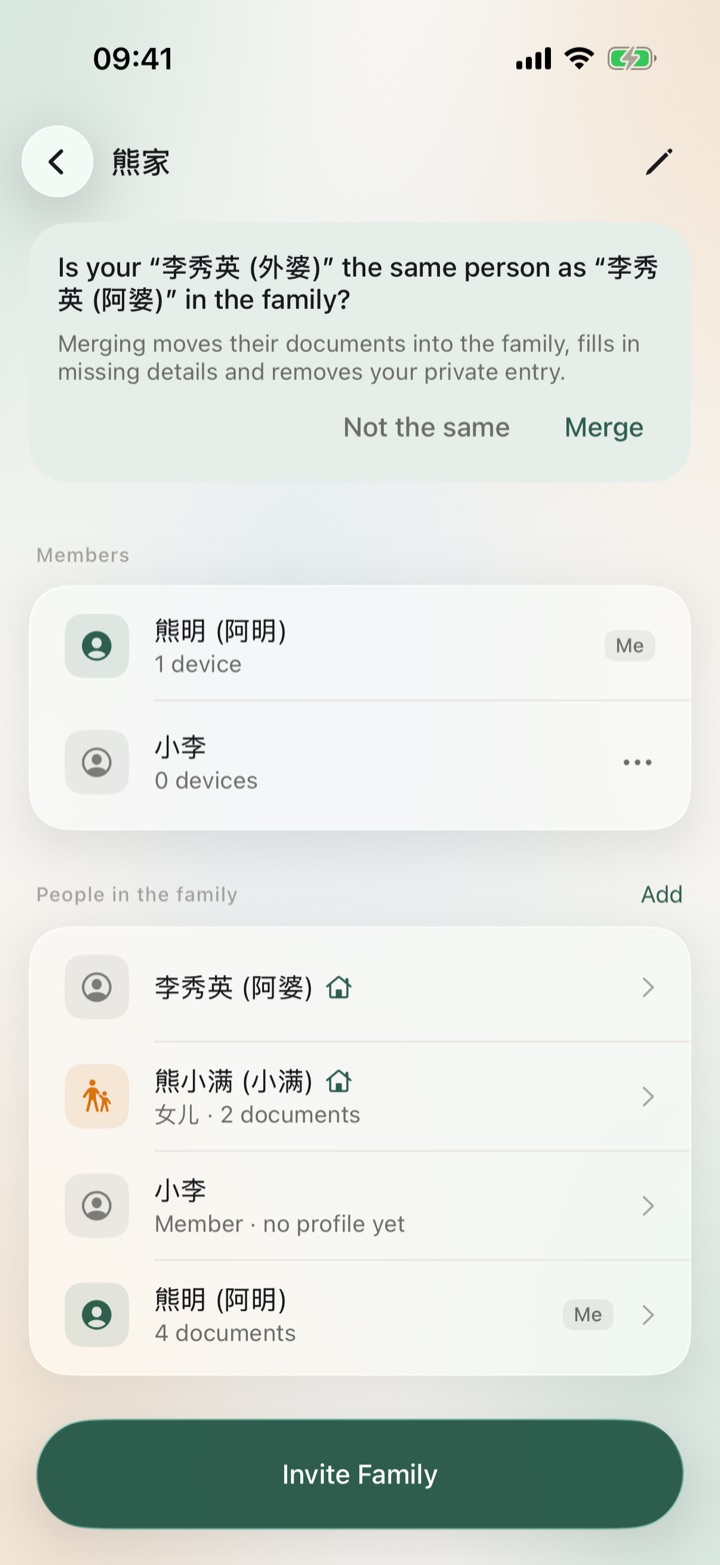
Family page: a prompt asks whether your 李秀英 (外婆) is the same person as 李秀英 (阿婆) in the family, above the members and people in the family
Family

Your family’s documents, looked after together

  • “People in the family” lists everyone. Tap “Add” to pick from your People, or create someone new
  • If someone a family member added is a person you already have, it asks first, and merges them only when you tap “Merge”
  • Only the people you put in Family and their documents are shared. Your chats, memories, notes and spending stay yours
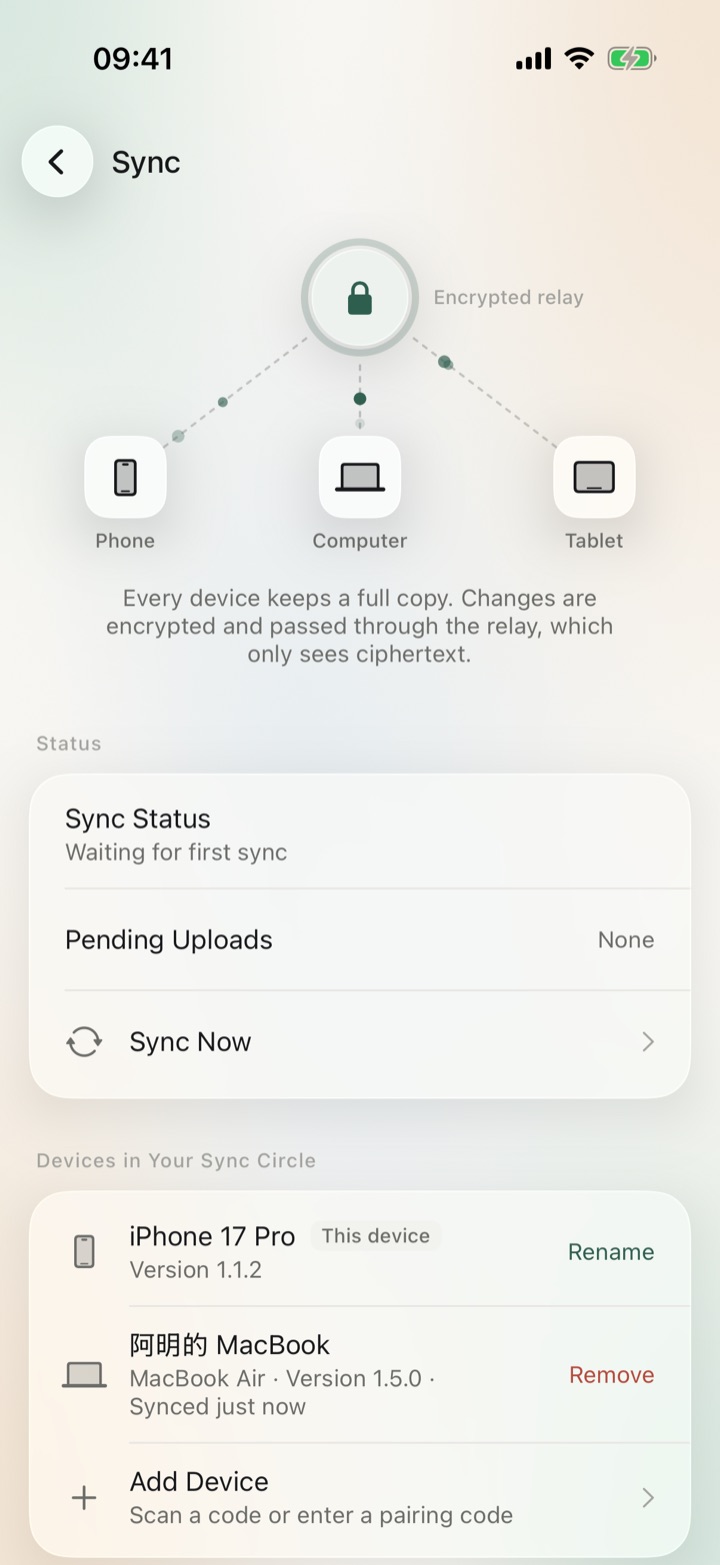
Sync: the encrypted relay diagram and the devices in the sync circle, this iPhone and 阿明的 MacBook, with options to rename, remove or add a device
Sync

Your phone and computer share the same records

  • Show a QR code on one device and scan it with the other, and they’re paired. No account. Both sides tell you when the new device has joined
  • The device list shows each device’s name, model and app version
  • Remove a device you no longer use. It stops receiving new data and the sync key is replaced

On every device

iPhone, Android and Mac share the same records and sync once you pair them by scanning a code. The app comes in English and Chinese, and your Region decides which document types are offered.

iPhone

iOS 26 or later · In App Store review

Snap documents, set reminders in a sentence and read your daily briefing. Lock your documents with Face ID.

Android

Android 8.0 or later

Reminders ring on time, and it can add events to your calendar and set alarms. Lock your documents with your fingerprint.

Mac

macOS 26 or later

The same Confidant, with a few extra tools for your desktop.

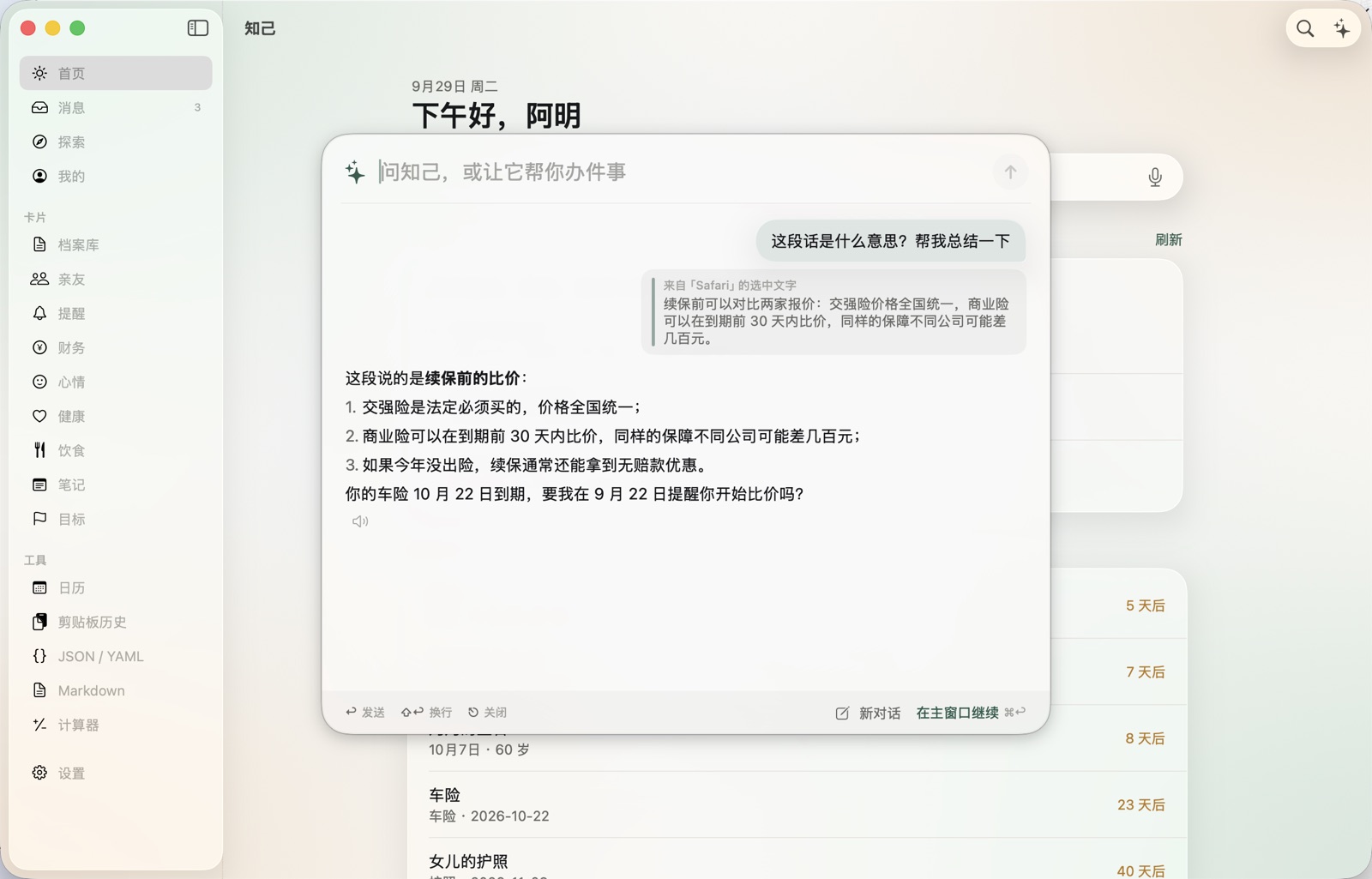
Confidant for Mac: the Quick Ask panel floats over the main window’s Home page, having summarized a car insurance renewal notice selected in Safari and offering a reminder to compare quotes
  • ⌥Space

    Quick Ask

    Bring it up in any app. Selected text comes along automatically.

  • ⌥⌘Space

    AutoFill

    A form wants your ID or passport number? Fill it from the Vault after you verify.

  • Drag into the main window

    Drop to File

    Drop in a PDF or screenshot and it picks out documents and travel plans.

  • ⌥⌘LLauncher ⌃⌥=Calculator ⌃⌥JFormatter

    Launcher · Calculator · Formatter

    Handy little tools, each one a shortcut away.

Your life stays on your own devices

The more an assistant knows, the more useful it is. That’s exactly why we spell out where the lines are.

Phone Encrypted relay · sees only ciphertext Computer
Every device keeps a full copy of your data. Changes are encrypted and passed between devices through the relay. Pair by scanning a code, no account needed.

Data stays on your device

Records, memories, spending and chats are kept on your own device. We never receive them. No sign-up, and no analytics or ad SDKs of any kind.

Consent comes first

Before you use AI for the first time, Confidant explains what gets sent to the Volcano Engine Ark model, and starts only once you agree. You can withdraw consent anytime in Settings.

It asks before acting

Anything that changes your phone shows a confirmation card first, saying exactly what it will do. It runs only after you tap “Allow”, and every step is logged.

Encrypted sync, no account

Your data is encrypted before it leaves your device and passed along by a relay. We don’t hold the key and can’t read it.

How it differs from a general AI chatbot

General AI chatbotConfidant
MemoryForgets once you start a new chatRemembers your preferences, family and important dates for the long run
ActionTells you how to do itWith your OK, adds calendar events, sets alarms and logs expenses itself
InitiativeSilent until you askReminds you ahead of expiry dates, birthdays and budgets
Your dataStored on the provider’s serversStays on your phone; export or erase it in one tap
AccountSign-up requiredNo account needed

Questions

What is the Volcano Engine Ark API key, and what does it cost?

Confidant uses it to call Volcano Engine Ark’s models. Turn on Ark in the Volcano Engine console, create an API key and paste it into Me → Model. Model usage is billed by Volcano Engine Ark based on how much you use, and you settle it with them directly. Confidant never handles it. The key is kept only in your device’s secure storage.

Where is my data stored?

In a database on your own device. We don’t have a server that stores your data. Once you agree, only what a conversation needs is sent to Volcano Engine Ark to generate a reply. With sync on, changes are encrypted on your device and passed along by a relay that only sees ciphertext.

What happens when I get a new phone?

If you still have the old phone, add a device from its Sync page and scan the code with the new phone. Everything syncs across. You can also export a backup in Me → Data and restore it on the new phone. Android and iPhone use the same backup format, so either can import the other’s. Backups don’t include your API key or photos.

How do family members join?

In Me → Family, tap “Invite Family”, and your family member scans the QR code on your screen with Confidant. From then on, both of you can see and edit the people in the family and their documents. Each person’s chats, memories and spending stay private.

Which systems are supported?

Android 8.0 or later and macOS 26 or later, available to download now. The iPhone version needs iOS 26 or later and is in App Store review. The app comes in English and Chinese.

Is it free?

Confidant itself is free, with no in-app purchases or subscriptions and no sign-up. The only cost is model usage, which Volcano Engine Ark bills you for based on how much you use.

Download Confidant

The first time you open it, you’ll enter your own Volcano Engine Ark API key, which Confidant uses to call the model.

Android

Version
1.6.0
Size
4.6 MB
Requires
Android 8.0 or later
SHA-256
3901bb723a0275cac99d77efe0f0460088d22faa12f049d9d974961a0085dd00

If you’re warned about unknown sources during install, allow your browser to install apps in the system prompt.

Mac

Version
1.6.0
Size
10.5 MB
Requires
macOS 26 or later
SHA-256
9753c387eba2b6ed2f68daed75c50ad8820760694bc651bdf4a2374ac7750733

Open it and drag Confidant into Applications. Notarized by Apple.

iPhone

In App Store review

Requires iOS 26 or later. The App Store link will go here once it’s live.